TABLE OF CONTENTS
- What the Record Usage report shows
- How to open the report
- Conterra Usage tab
- External Usage tab
- Integration Usage tab
- When to use this report
- Questions & Answers
What the Record Usage report shows
Before you delete or merge a reference record — an employee, payroll item, customer job, build plan, vendor, and so on — you need to know what else in Fieldclix depends on it.
The Record Usage report answers that question in one place. It opens for a single record and lists three kinds of dependencies:
| Tab | What it lists |
|---|---|
| Conterra Usage | Other Fieldclix cards and tables that store a reference to this record (leading reference or requisite fields) |
| External Usage | Database tables that still hold this record’s ID in a foreign-key column (row counts per table) |
| Integration Usage | Integrated system links — pairings between this FCX record and objects in Paylocity, QuickBooks, Prism, Paycom, or other connectors |
The report is available in FCX Web. It replaces the older desktop-only usage view with a consistent web experience and adds the Integration Usage tab for payroll and accounting sync troubleshooting.
How to open the report
From a web card header
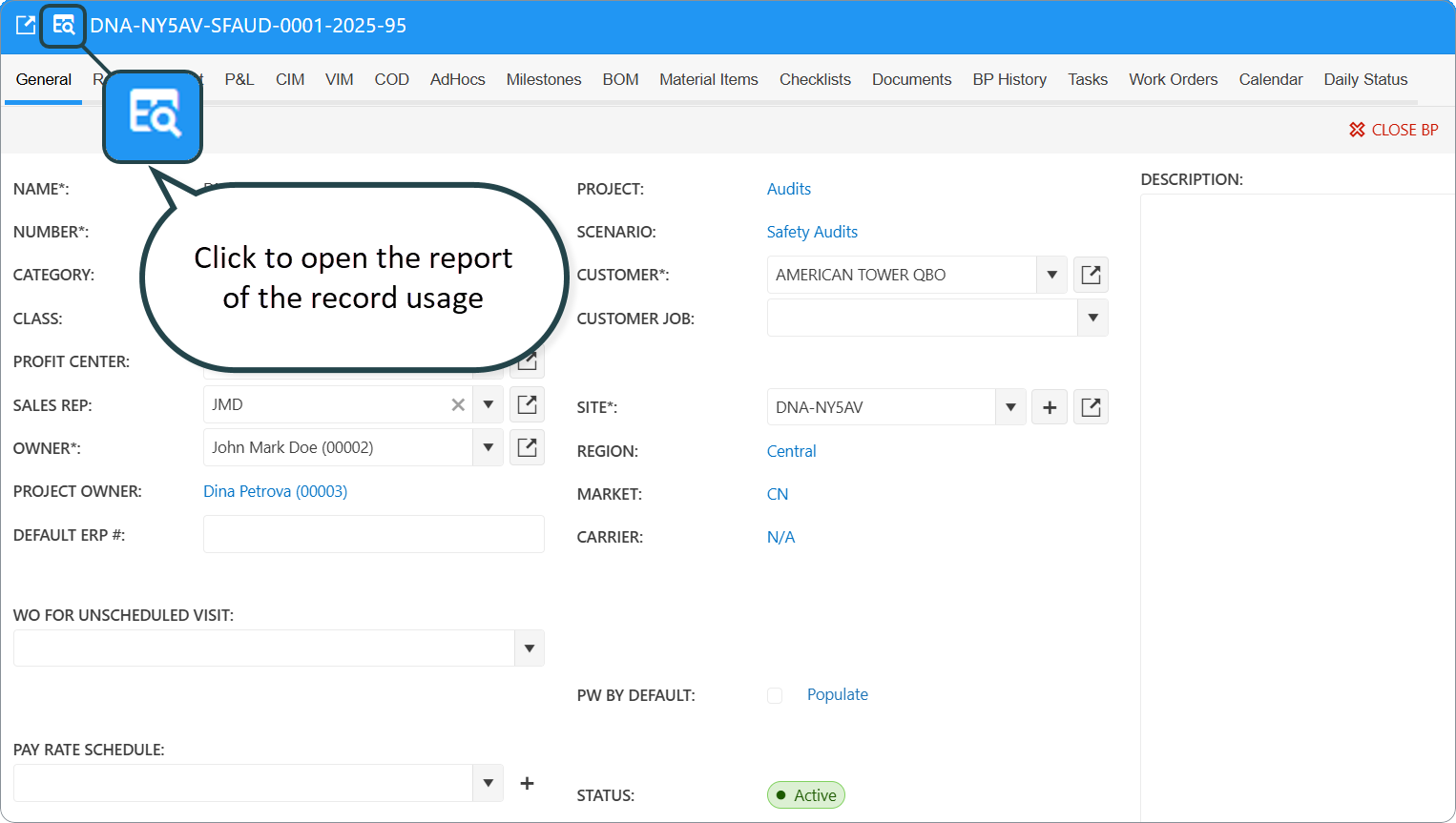
- Open a record in FCX Web (Build Plan, Employee, Payroll Item, Vendor, and other cards that use the standard web card wrapper).
- In the card header, click the table-search icon.
- Tooltip: Open Related Records Page
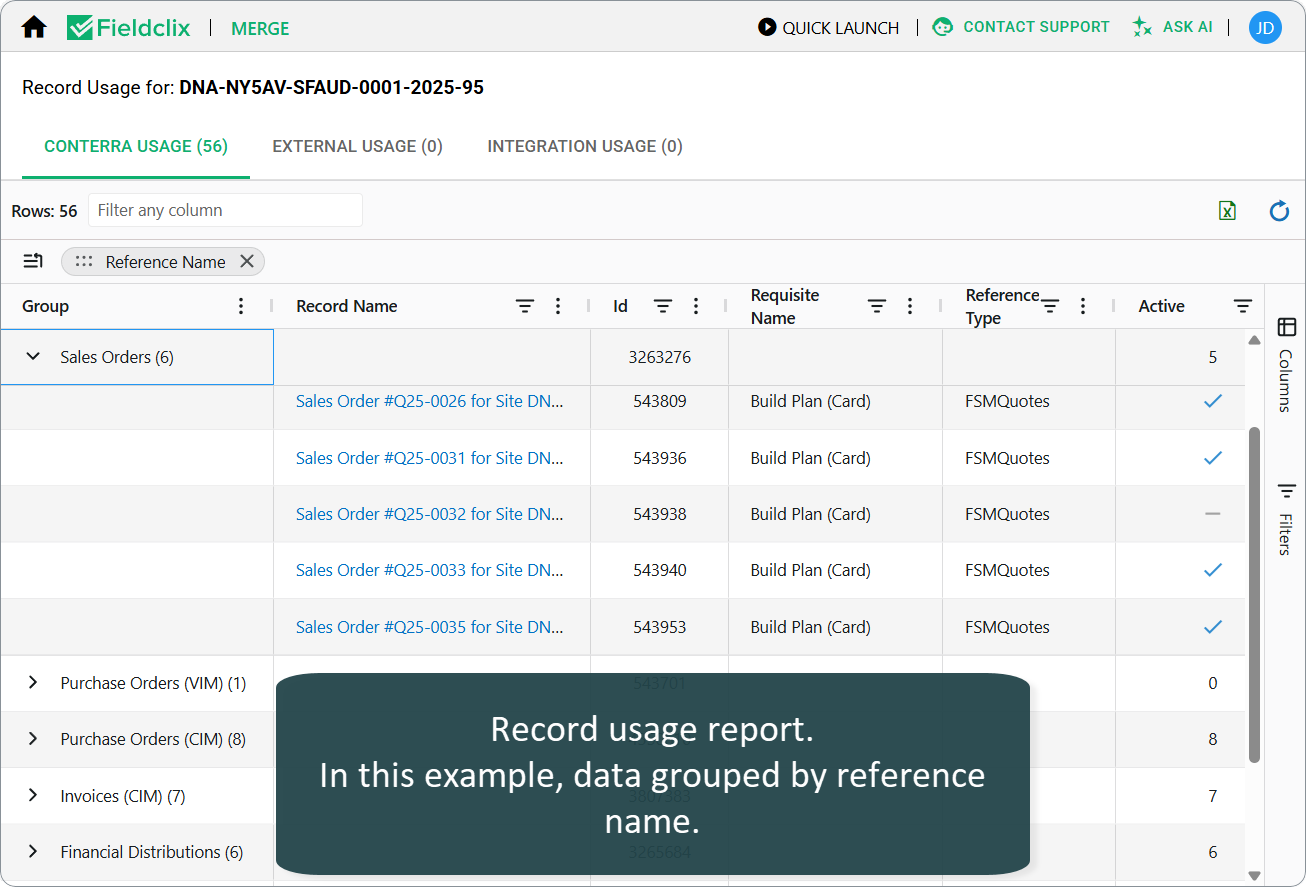
- A new browser tab opens the Record Usage report for that record.
The page title shows: Record Usage for: [record name].
Conterra Usage tab
Lists Fieldclix reference usage — where this record appears as a leading reference or in another stored requisite on a different card or table.
| Column | Meaning |
|---|---|
| Record Name | The dependent record (click to open its card) |
| Id | Internal ID of the dependent record |
| Reference Name | Type of the dependent reference (for example Employees, Build Plans) |
| Requisite Name | Which field links to your record (includes table section name when applicable) |
| Reference Type | Internal type code for navigation |
| Active | Whether the dependent record is active |
How to use it
- Sort and filter columns to find blocking dependencies before delete or merge.
- Click Record Name to open the dependent card and clear or reassign the link.
- Export grid data from the status bar when you need a spreadsheet for change control.
External Usage tab
Lists low-level database references — tables and columns that still store this record’s ID, with a row count for each.
| Column | Meaning |
|---|---|
| Table Name | Schema-qualified table name |
| Column Name | Column that holds the foreign key |
| Rows Count | Number of rows pointing to this record |
How to use it
- Primarily for implementers and support validating cleanup scripts or migration impact.
- A non-zero Rows Count means data still exists outside normal card requisites — investigate before archiving the record.
- The IntegratedSystemsObjectLinks table is excluded from this scan; see Integration Usage instead.
Integration Usage tab
Lists external integration links for this FCX record — the same logical “handshake” between FCX and Paylocity, QuickBooks, Prism, Paycom, etc.
| Column | Meaning |
|---|---|
| Created | When the link was created (newest first) |
| Integrated System Code | Connector / instance code |
| Integrated System Reference Name | Object type on the integrated side (Employees, Payroll Items, …) |
| Integrated System Object ID | ID in the external system |
How to use it
- Before re-syncing an employee or pay code — confirm an old link will not point payroll export to the wrong external ID.
- After payroll system cleanup — find orphaned FCX links that block a fresh match.
- Paylocity / QB / Prism troubleshooting — pair with field-mapping articles to see both sides of the mapping.
For business rules on how links are created and matched, see FCX External Links Table and your system’s Field Mapping Paylocity and Fieldclix or Field Mapping QuickBooks and Fieldclix article.
When to use this report
| Scenario | Tab to check first |
|---|---|
| “Can I delete this Payroll Item?” | Conterra Usage |
| “Why does sync still use old Paylocity ID?” | Integration Usage |
| “Merge two Employees — what breaks?” | Conterra Usage + Integration Usage |
| “DB still has rows after card looks clean” | External Usage |
| Change management / audit trail | Export from any tab |
Questions & Answers
Q: Who can open Record Usage?
A: Any user who can open the web card for the record and sees the table-search icon in the card header. There is no separate menu item on the home page — open it from a card.
Q: Why is Conterra Usage empty but I know this record is used?
A: The report scans stored requisites configured on the reference type. Some runtime or calculated links may not appear. Check External Usage or open known dependent cards manually.
Q: Why is Integration Usage empty?
A: No row exists in integrated-system object links for this record. Sync may never have created a link, or links were removed. New links appear after the next successful sync that matches or creates the external object.
Q: What does External Usage mean for end users?
A: Usually nothing day to day. It is a technical dependency list. Contact your Fieldclix administrator if row counts block a requested delete.
Was this article helpful?
That’s Great!
Thank you for your feedback
Sorry! We couldn't be helpful
Thank you for your feedback
Feedback sent
We appreciate your effort and will try to fix the article