TABLE OF CONTENTS
- What is Financial Distribution in FCX
- Access to Financial distribution reference
- When FD is created and updated
- Where we use FDs
- Financial Distribution errors
- FAQ
What is Financial Distribution in FCX
Financial Distributions reference holds details of actual spends and incomes. A Financial Distribution (FD) is a record that represent a financial transaction that we used in Fieldclix financial reporting.
Each Financial Distribution record shows the distribution of a specific source of financial funds: within a financial account and Build Plan.
We distinguish several source types of financial distributions.
- Revenue group — CIM Invoices.
- Expenses group: Bill of Materials (BOM), COD Purchases, Employee Payroll Period Overhead, Time Keeping, VIM Invoices.
Financial Distribution card
Source type shows where we exactly get data in a financial distribution. Let's look closer on the Financial Distribution card.
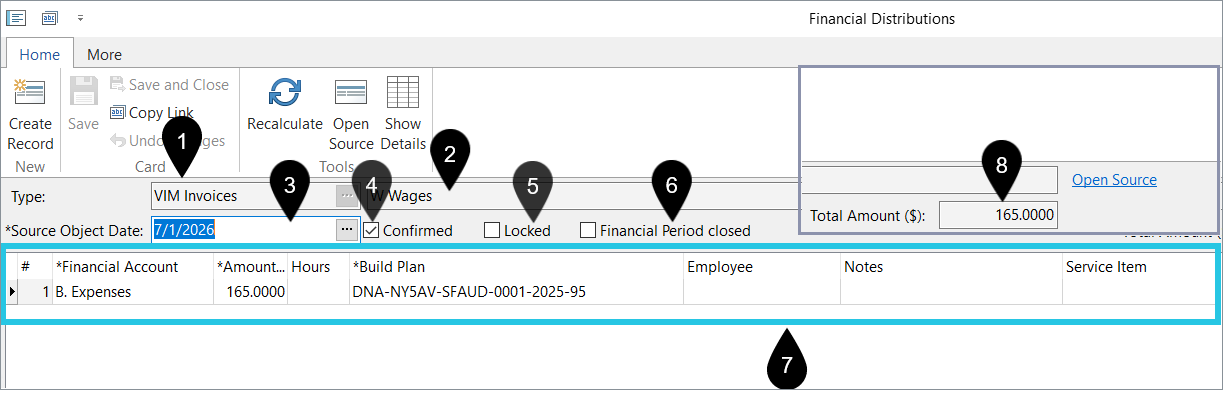
1. Type — source type: where we pull in amount, hrs, BP allocation, etc.
2. Source Object Name. It shows you the name of the FD's source: a Time Card name and so on.
3. Source Object Date: Invoice date, BOM date, COD Purchase date, etc.
4. Confirmed — indicates that the Financial Distribution is correct and can be used in financial statements.
The FCX system automatically marks FDs as confirmed when:
- CIM Invoice – as soon as the invoice stage becomes submitted, received, accepted or paid.
- BOM – once a BOM goes to the Kitted or Completed stage.
- COD – when a COD is approved (if COD Purchase Category does not stipulate transforming to VIM Invoice).
- Employee Payroll Period Overhead – when the related payroll period is paid. Overhead type of payroll period includes all payroll overhead expenses, and it's factored into the Corporate Overhead Build Plan.
- TK – when a Time Card paid date is passed.
- At first, the system checks whether the Time Card's payroll period is paid. If YES, then marks FD as confirmed.
- If the payroll period is not paid yet → it checks that the paid date in the related payroll check is passed → if yes, it will confirm the TC's financial distribution.
- VIM Invoice – after an invoice is approved or paid.
5. Locked — use to block the Financial Distribution from automatic changes. In this case, the system will not update the FD if source data is changed. The Recalculate action is also not available for locked FDs.
If you lock an unconfirmed FD, you need to confirm it manually: check the box “Confirmed”.
6. Total Amount ($) — sum of the Amount column.
7. Allocation table — shows the amount summarized and recorded in the particular financial account.
- Service Item — summarizes the service line for the distribution (when populated from the source).
It reflects the same values built into allocation table lines — see FD Allocation Table below for source-specific rules (for Time Keeping: Activity, then Cost Type, then Work Order type).
To change Service Item on TK distributions, fix activities / allocations on the Time Card and Recalculate the FD (if not locked).
- Vendor — lines may show a Vendor column when the source (Bills, COD purchases) provides it.
- In reports
- P&L Details — vendor may appear on expense lines from vendor bills.
- Build Plan Budget — actuals can roll up by ? (Vendor) under a Financial Account when transactions carry vendor
- In reports
8. Financial Period closed — indicates that the corresponding period is closed. No changes to the FD are allowed: recalculation, manual changes to the table, locking the FD.
What is a Financial Distribution Line?
A Financial Distribution (FD) line is one row that shows how part of money from a source object is assigned for financial reporting.
Think of it as a single allocation unit:
- one part of cost/revenue,
- linked to business context (for example project/build plan, employee, service item, date, source object),
- prepared for finance analytics.
A full Financial Distribution record is a set of these lines that splits one source (like a time card or invoice) into clear financial pieces.
They are used in:
- P&L dashboard (details and grouped totals),
- profitability and variance analysis,
- drill-downs back to source documents (time cards, invoices, etc.).
How lines are grouped
There are two grouping levels:
- Inside FD (line uniqueness control):
- lines are treated as duplicates if they have the same key combination (build plan, financial account, employee, and notes). This helps prevent repeated allocation rows.
- In analytics (for example P&L dashboard):
- FD amounts are aggregated by business dimensions, including build plan, service item, and financial account, then summed into totals.
Also important: grouped analytics use only lines that are ready/approved: free of missing data.
FD Allocation Table
How the system fills each FD line in the table depends on Source Types and several rules:
| FD CIM Invoice | From CIM Invoice |
Financial Account | ← static value from the system setting FAForFSMInvoices Generally, it is Total Revenue. |
Amount | ← Invoice Total |
Build Plan | ← Build Plan |
| Service Item | ← from the CIM Invoice SO's Allocation table |
| FD BOM | From BOM |
Financial Account | ← static value from the system constant FABOMBillableAccounts |
| Amount | ← BOM Total |
| Build Plan | ← Build Plan |
| Service Item | ← from the BOM's billable/non-billable Financial Account |
| FD COD | From COD Purchase |
| Financial Account | ← Financial Account |
| Amount | ← Total Amount |
| Build Plan | ← Build Plan |
| Service Item | ← from the COD's Financial Account |
| Vendor | ← Vendor on the COD transaction |
| FD Employee Payroll Period Overhead | From Cost Rates table in Payroll Period |
| Financial Account | ← static value from the system setting PayrollOverheadFAID |
| Amount | ← Total amount of lines with “AdHoc Overhead” applied addition type from Cost Rates table in Payroll Period |
| Build Plan | ← static value from the system constant NonWorkBuildPlanID |
| Employee | ← Employee from lines with “AdHoc Overhead" applied addition type in Cost Rates table in Payroll Period |
| Service Item | ← pulled from the Financial Account mapped to the Payroll Item where the addition type is "AdHoc-Overhead". If that is missing, it falls back to the Financial Account specified in the Employee Payroll Period Overhead setting, and the Service Item is taken from there. |
| FD Time Keeping | From Time Card payroll allocation table |
| Financial Account | ← follows the priority |
| Amount | ← Hrs * Rate. Cost Rates also use the priority. |
| Hours | ← from the Time Card payroll allocation table. Hrs are summed over a Build Plan and FA. |
| Build Plan | ← from the Time Card payroll allocation table |
| Employee | ← Employee from Time Card |
Service Item | ← from the Time Card's Payroll Allocation Table: for wage rows 1) from Activity 2) if empty → from Cost Type 3) if empty → from the type of the associated Work Order for non-wage rows 1) from the type of the associated Work Order |
| FD VIM Invoice | From VIM Invoice PO/FD allocation table |
| Financial Account | ← Financial Account |
| Amount | ← Amount |
| Build Plan | ← Build Plan |
| Notes | ← FA Notes |
| Service Item | ← from the VIM Invoice Service Items/Accounts Allocation table |
| Vendor | ← Invoice vendor |
Negative amounts on distributions
For most Financial Distribution source types, you cannot enter a negative Amount on an allocation line, and automatic Recalculate fails if the source produces a negative line.
Exceptions: Bill of Materials (return BOMs), Employee Payroll Period Overhead, and Ad Hoc Credit distributions.
Negative amounts on Payroll Period Overhead distributions
For Employee Payroll Period Overhead distributions, negative amounts often come from payroll period cost adjustments:
- Overhead allocation reverses or adjusts a prior period entry.
- Cost import and overhead split produce a net credit on an account.
What you should do
- Open the FD and review the Allocation table and source Payroll Period.
- If unexpected, re-run Process Period Costs / overhead calculation for that period (with your accountant).
- Do not manually flip signs unless your process allows it — fix the source payroll data first.
Tools in FD card

Access to Financial distribution reference
Accountants and Bookkeepers user group has full access to the Financial Distributions reference.
When FD is created and updated
You do not need to create a financial distribution manually, the system creates it automatically with a script.
The script runs 4 times a day (from 6 am to 6 pm), creates financial distributions according to Fin. Analysis settings, and updates the allocation table in existing unlocked FDs (pulling actual data from source objects: Time Cards, Invoices and so on).
We use the Financial Analysis Reference to set:
- the start date for generating FDs within a source type,
- conditions for confirming an FD record.
For TK FDs we do not fill in the table if we do not have any cost rates (synced from the payroll system or specified in Employee, Site or WO Type Cost). Where we use FDs
We use Financial distributions data to calculate actual amount of revenue and expenses in dashboards, like Status, Executive, WIP, P&L dashboards.
We show all FDs (confirmed and not) in the following dashboards: Budget, BP, Executive, Status.
We show FDs according to the filter “Confirmed Only” in the next dashboards: P&L and WIP.
Financial Distribution errors
Incomplete FDs must be corrected to maintain the integrity of financial reporting.
To keep track of errors in Financial Distributions calculation, you can use the corresponding notification. This notification event will remind an Employee your specified about errors in FDs, for example, about incomplete allocation: empty FA or Build Plan.
Send a request to FCX Support to set up a notification to your liking: recipient, notification channel and so on.
FAQ
Q1: Why is Financial Account empty in FD line?
If a Financial Account (FA) is empty on a Financial Distribution (FD) line, check these four areas in order:
- Verify Source Rules:
- TK: Check payroll item, cost type, WO, or category rules. Follow the priority scheme.
- CIM Invoice: Check the FAForFSMInvoices setting. Available for Administrators only.
- BOM: Check the FABOMBillableAccounts setting. Available for Administrators only.
- VIM/COD/Payroll Overhead: Ensure the FA is selected or derivable on the source record.
- Complete Source Data: For TK, ensure required fields (Work Order, Cost Type, Payroll Item) are filled so the system can map the account. Use the Payroll Period's dashboard Details tab.
- Recalculate: After fixing the source data, trigger a recalculation/refill of the distribution.
- Check Compatibility: If the FA is selected but blocked, ensure the account type (Revenue vs. Expense) matches the FD source type.
Q2: Why is Amount missing in Time Card Financial Distribution?
Q: Why is the amount missing or zero in Time Card distribution lines?
A: In most cases, the system could not calculate a valid labor cost rate for that entry. When rate is unavailable, the line is usually calculated as zero.
Q: What are the most common reasons?
A:
- payroll mapping is missing for the time entry;
- mapping conditions do not match the actual entry context (time type, wage conditions, state/location, activity, shift, employee classification);
- no cost rate is configured for the matched context;
- a rate record exists but has no numeric value.
Q: Is this the same as “amount not set” validation error?
A: Not always.
For Time Card sources, missing rate usually results in zero amount.
“Amount not set” is more often a sign that distribution lines were not built correctly, not just that rate is missing.
Q: What should I check first?
A:
- The Time Card has no allocation problems.
- Payroll mapping is configured for this scenario.
- Cost rates exist for the exact employee/context/date conditions.
- Recalculate payroll/time-card costing.
- Rebuild financial distribution.
Q: What is the expected result after fixing setup?
A: Distribution lines are rebuilt with valid amounts, and zero/missing amount cases disappear for corrected entries.
Q3: Why line is not approved even if present?
FD line is considered approvable only when all key fields are present:
- Financial Account
- Build Plan
- Amount
- Source Date
- If one is empty, line stays unapproved.
Q4: Why is Vendor blank on a Time Keeping FD?
Labor distributions usually have Employee and Service Item, not Vendor. Vendor appears on vendor-driven sources (bills, COD purchases).
Q5: Does Vendor on FD affect P&L grouping?
P&L groups primarily by Financial Statement setup (Build Plan, Service Item, etc.). Vendor detail is strongest in FD drill-down and budget actuals.
Was this article helpful?
That’s Great!
Thank you for your feedback
Sorry! We couldn't be helpful
Thank you for your feedback
Feedback sent
We appreciate your effort and will try to fix the article