TABLE OF CONTENTS
Time Keeping Managers, clone employee time cards quickly using Clone Allocation From or Clone Allocation To. These options copy payroll details, non-wage items, reasons, lunch flags, and amounts. All actions are logged in history.
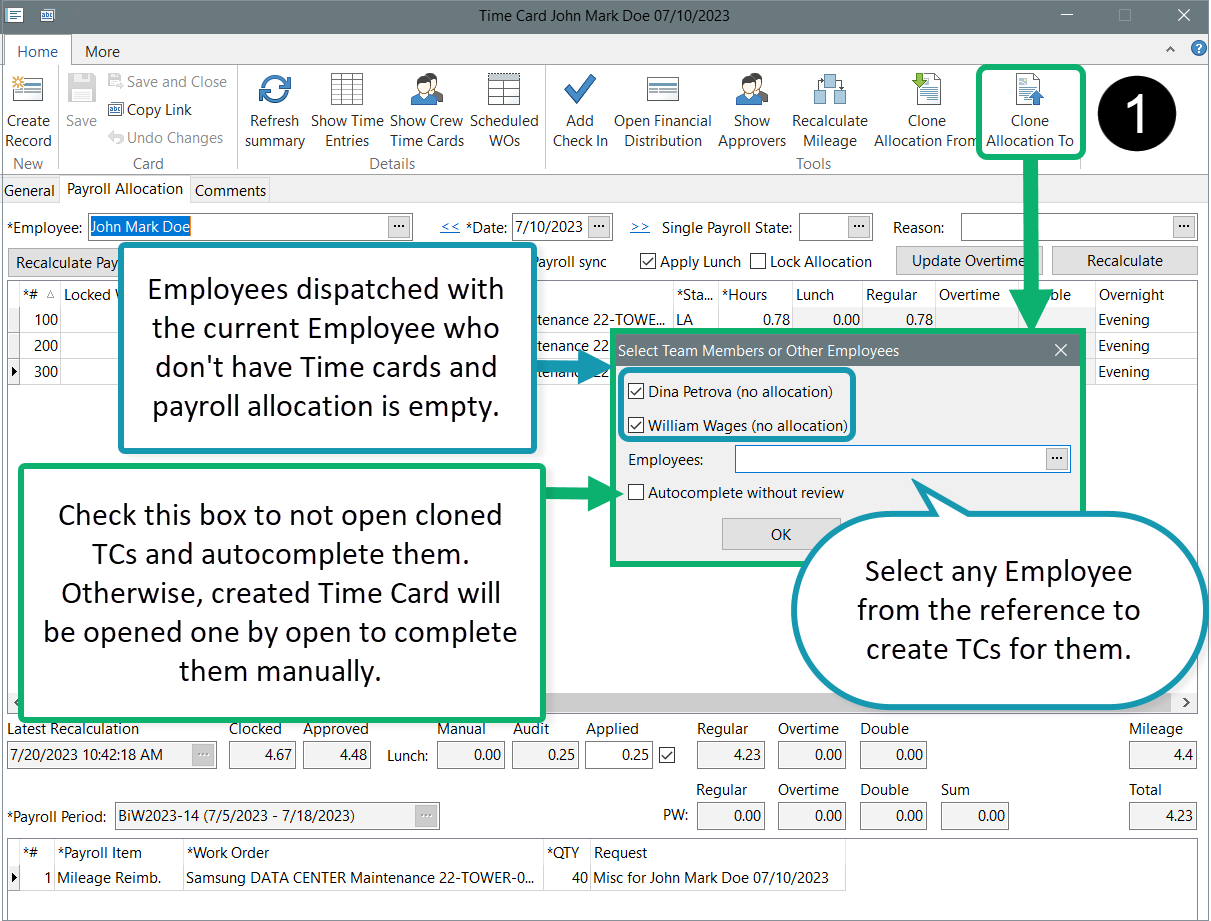
Clone Allocation To
1. Open the source Time Card.
2. Click Clone Allocation To.
3. Select Crew Members or Employees — the system builds their Time Cards from the source.
4. Review the new Time Cards (unless you select autocomplete without review).
5. Click Save.


Clone Allocation From
- Create a new time card via the Time Cards reference or dashboard or open an existing one to edit.
- Click Clone Allocation From.
- Select the source Time Card to import all allocation data.
- Review, save, and complete the updated Time Card.


Was this article helpful?
That’s Great!
Thank you for your feedback
Sorry! We couldn't be helpful
Thank you for your feedback
Feedback sent
We appreciate your effort and will try to fix the article