TABLE OF CONTENTS
Cost Types Card
Overview
The Cost Types reference is a system-managed reference not directly accessible to users for viewing or creating records. However, its records appear when selecting a Cost Type in areas like Work Order Type, Employee Cost, Reason, etc.
Each instance includes a default set of Cost Types, such as:
- On site
- Office/warehouse
- Drive
- Intermediate drive
- Unauthorized stop
To add a custom Cost Type, contact FCX Support.
Users with administrator rights can edit Cost Type settings, including checkboxes and table values.
Purpose and Integration
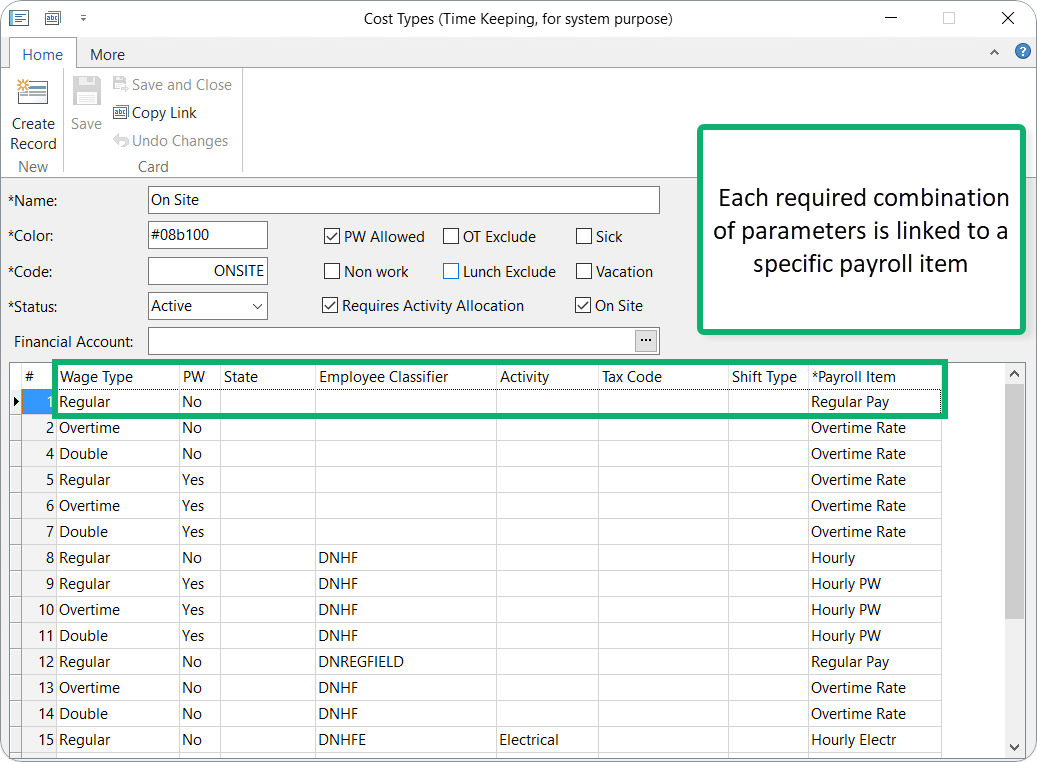
The Cost Types reference links worked hours to specific wage types and payroll items. This enables Cost Rate calculations and supports Financial Distribution.
Key requirement: Payroll Item is mandatory for Financial Distribution calculations.
You can assign Wage Type and Payroll Item based on an Employee's Classifier, defined in the Additional Classifier field of the Employee's Time Keeping Configuration card.
Prevailing Wage (PW) note: For wage types requiring PW, add a new row with the active PW mark.
Cost Type Card Settings
The Cost Type card includes these configurable options:
- PW Allowed: Permits recording hours for this Cost Type as prevailing wage.
- OT Exclude: Excludes hours from overtime calculations.
- Lunch Exclude: Prevents applying lunch hours to payroll lines for this Cost Type.
- Sick and Vacation: Enables registering hours as sick or vacation time (select checkboxes).
- Non Work: Marks hours as non-work; automatically assigns to a non-work Work Order (static or from Employee's TK configuration). For example, selecting a 'non-work' Cost Type in TC Adjustment allocates hours to non-work WO.
- Color: Sets the display color for time entries on maps and timelines.
- Requires Activity Allocation: Enabling this box allows activities to be applied to hours recorded against that cost type. This also activates the Activity field in the Time Card Adjustment interface and Time Card Payroll Allocation table.
- It is recommended to enable this option only for On Site and Office/Warehouse cost types to ensure accurate labor allocation.
- Do not enable for Drive cost types.
- On Site: This flag identifies hours as "On-Site" for specialized reporting, such as the Daily Dashboard. You’ll typically see this enabled for "On-Site PW" or "On-Site Differential" types.
- Financial Account: Charges all hours under this Cost Type to the specified account, based on priority rules (see below).
- Service Item: Assigning a Service Item directly to a Cost Type categorizes labor hours by their operational environment or cost classification rather than the individual task or job.
- This approach is ideal for businesses that prefer to track financials by how and where the time was spent (e.g., distinguishing between active field labor and transit time) rather than by specific tasks (Work Activities) or job categories (Work Order Types).
Key Benefits
- QuickBooks Syncing: Hours recorded against these Cost Types seamlessly map to your corresponding Service Items when exporting time data to QuickBooks.
- Financial Reporting: Every tracked hour automatically flows into your Profit and Loss (P&L) report, providing an accurate, real-time financial breakdown of your labor costs.
How Hours from Time Cards Match to Payroll Items
For a detailed breakdown of how the system "matches" time cards hours to your payroll items, please refer to the article.
Cost Type in Time Card Payroll table
When determining the Cost Type for rows in the Time Card Payroll Allocation table, the system evaluates sources in the following order and stops when a suitable Cost Type is found:
- Reason on Time Card
- If the Time Card has a Reason, the Cost Type from the Reason is applied to the Reason hours only.
- Time Card Adjustment – Non‑Work hours
- If the Time Card has an Adjustment and some hours are allocated to a Non‑Work Cost Type, the Cost Type from the Adjustment is applied to those Non‑Work hours only.
- Work Order Type: default and On Site only
- If the Work Order Type has a Default Cost Type and the On Site Only setting is enabled, that Cost Type is applied only to On Site time entries (time periods in the Time Card Adjustment).
- If the Work Order Type has a Default Cost Type and On Site Only is not enabled, that Cost Type is applied to all rows in the Time Card.
- Employee default Cost Type
- If the Employee has a Default Cost Type in the Time Keeping configuration, that Cost Type is applied.
- Time Card Adjustment – general
- If the Time Card has an Adjustment (and none of the above rules apply), the Cost Type from the Adjustment is applied.
- Time Entries (GPS‑based)
- If the Time Card contains GPS data stored, Cost Types are assigned according to GPS‑based rules from the Time Entries (a specific table with data).
- Fixed device / Office‑Warehouse
- If there is no GPS data but employee has the Fixed Location role, the Office/Warehouse Cost Type is used.

Open large image
You can right-click on the image and select “Open image in new tab”.
Was this article helpful?
That’s Great!
Thank you for your feedback
Sorry! We couldn't be helpful
Thank you for your feedback
Feedback sent
We appreciate your effort and will try to fix the article