TABLE OF CONTENTS
- Configure Invoice Categories
- Why categories matter
- General settings
- Defaults (prefill on new invoices)
- Approval settings
- Checklist before go-live
- FAQ
- Next in the set
- Related
Configure Invoice Categories
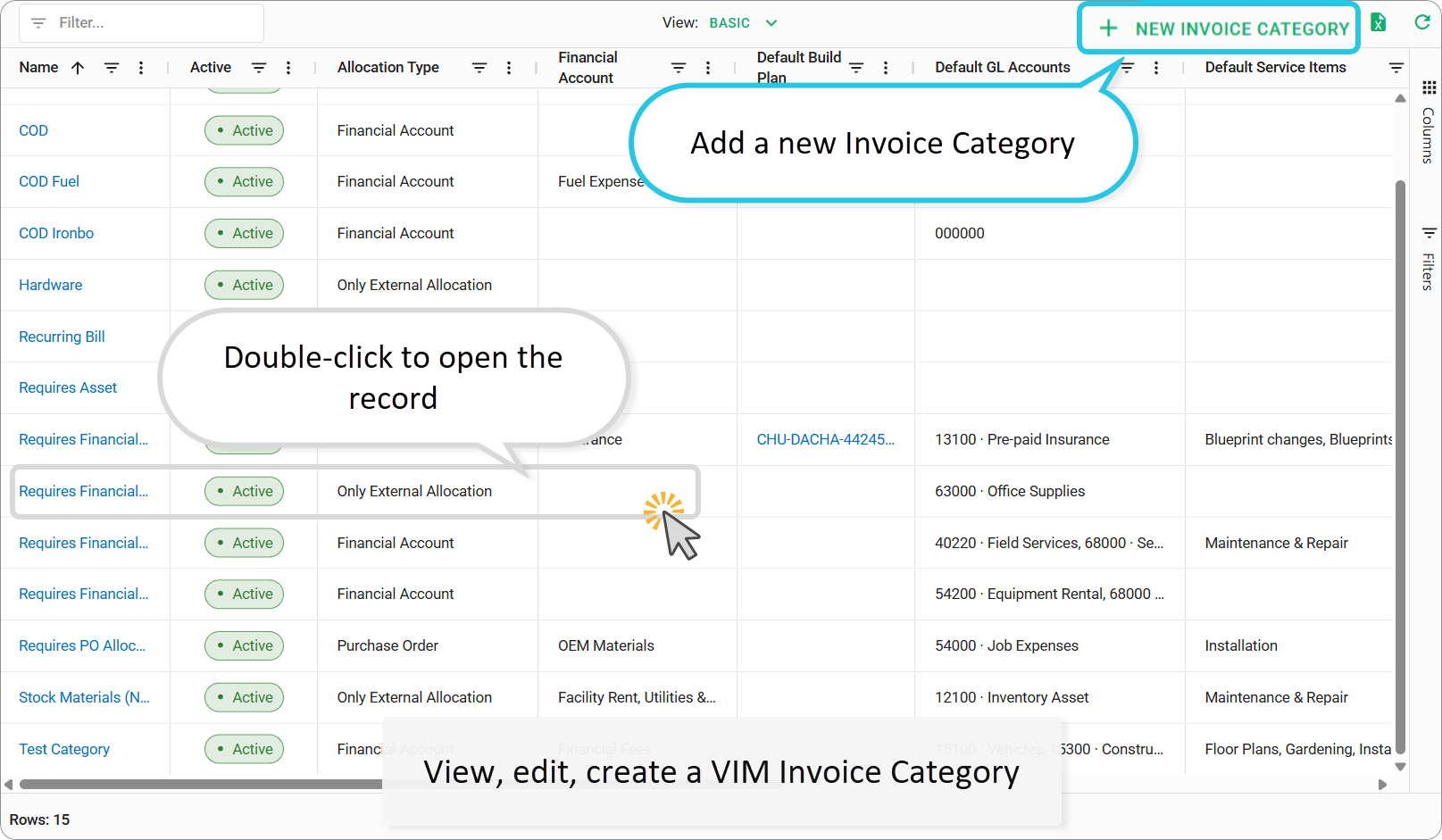
An Invoice Category tells Fieldclix how to treat a vendor bill: how to allocate costs, whether to sync to accounting, and who must approve it.
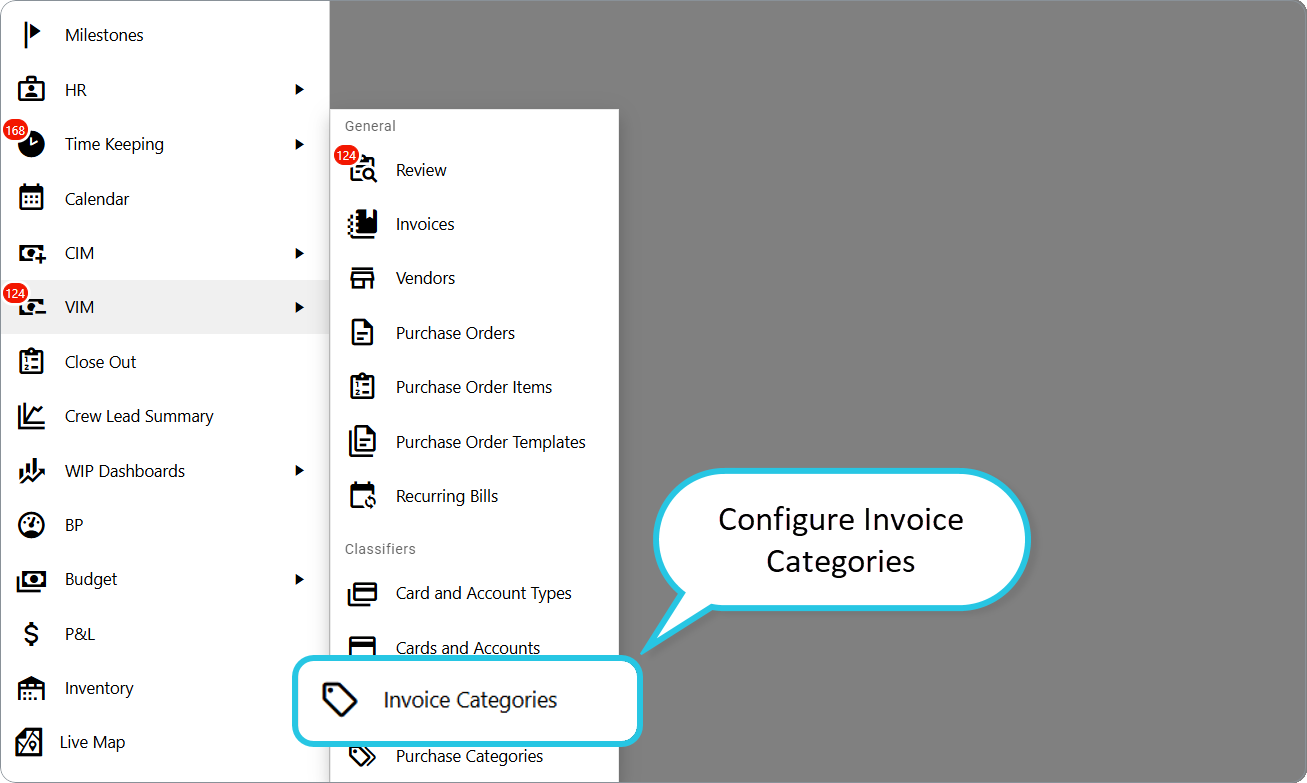
Set categories up before you process invoices day to day. Path: VIM → Classifiers → Invoice Categories.
Who can manage categories: Accountant and Bookkeeper or Project Library Manager.
Why categories matter
When someone picks a Vendor on an invoice, Fieldclix often fills Category from the vendor’s default. That category then drives:
Default allocation lines (Financial Account, Build Plan, GL accounts, Service Items)
Whether the bill should sync to your accounting system
Whether a VIM Validator can approve alone, or who sits on approval levels
Changing the vendor later can overwrite Category (and related defaults). See Process Vendor Invoices → Fill the invoice card.
General settings
Field | What it does |
|---|---|
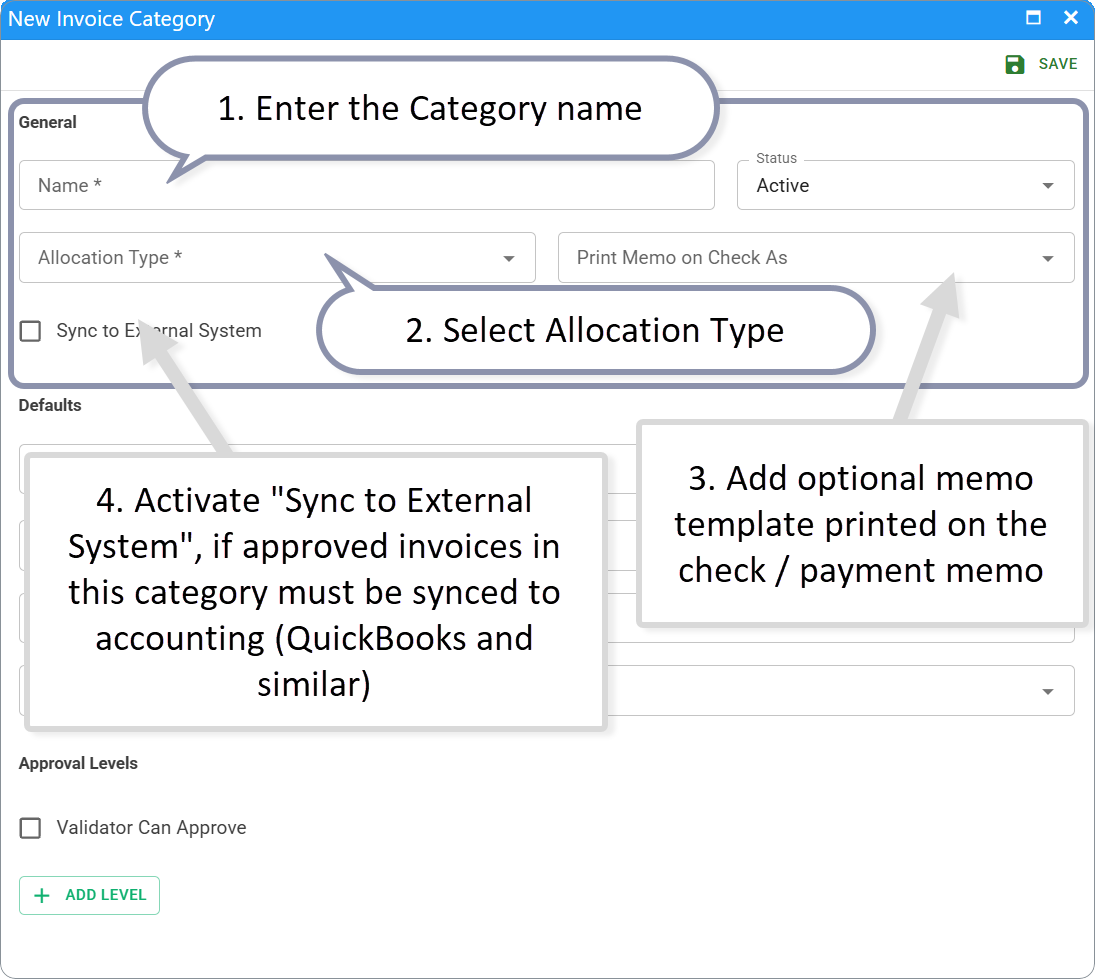
Name | Label shown on invoices and lists. |
Status | Active — available for new invoices. Closed — hidden from new picks. |
Allocation Type | Required. How this category of bill should be allocated (see below). |
Print Memo on Check As | Optional memo template printed on the check / payment memo (see supported values below). |
Sync to External System | When checked, approved invoices in this category are eligible to sync to accounting (QuickBooks and similar). |
Print Memo on Check As — supported templates
Pick one of these values. Fieldclix builds the invoice Memo from that template when the bill is created (and refreshes it when the invoice is saved, unless someone marked the memo as custom).
The filled Memo stays on the Vendor Invoice in Fieldclix. When the bill syncs to your accounting system, that memo goes with the other bill details (and can appear as the check / bill memo there). It is not generated at Pay time.
Template | What Fieldclix puts in the memo |
|---|---|
| Link to the Vendor Invoice card |
| Invoice Number |
| Names of Build Plans from the invoice allocation lines |
| Site IDs / site names from those Build Plans |
| COD card/account name, then store |
| Card/account, store, then Build Plan name (COD) |
| Card/account, store, then customer/job name (COD) |
| Store, then card/account name |
| Store and purchase description (COD) |
| Requester, store, and purchase description (COD) |
Empty parts stay blank in the combined memo. Templates with Card / Store / Requester are most useful for COD invoices; [URL], [Number], [BPNames], and [SiteIDs] work for regular vendor bills as well.
Allocation Type
Type | Typical use | Notes for invoice lines |
|---|---|---|
Financial Account | Costs go to Financial Accounts / Build Plans (most job expenses). | Automatic Financial Distribution can be built from Build Plan lines. |
Purchase Order | Bill is tied to vendor PO lines. | Automatic FD from Build Plan lines as for FA when lines support it. |
Asset | Asset-related purchases. | On the invoice, pick the Asset as required. Line Financial Account is not used, and Fieldclix does not build automatic Financial Distribution from those lines. |
ITJ | Inventory Transaction Journal allocation. | Same as Asset for FA / automatic FD: pick the ITJ as required; FA hidden; no automatic FD from lines |
Only External Allocation | Allocation only for the external system view (GL / Service Items), without the usual internal FA path. | Financial Account is hidden on lines. |
Pick one type that matches how AP should code that kind of bill. The invoice card’s Invoice Lines follow this choice (for example PO tools appear when the category is Purchase Order).
Use Purchase Order or Financial Account when you need automatic Financial Distribution from Build Plan lines. Asset / ITJ do not create that automatic FD.
Defaults (prefill on new invoices)
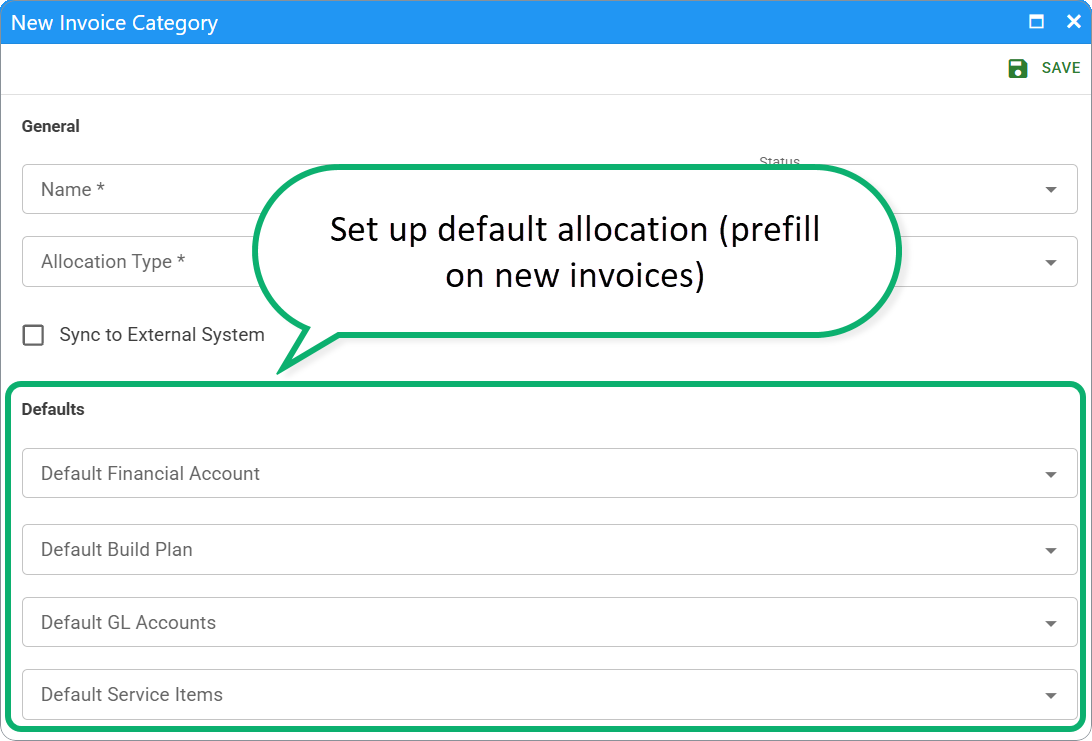
These values can prefill allocation when the category is applied (from the vendor or when you change category):
Field | What it does |
|---|---|
Default Financial Account | Starting FA on lines (not used for Asset / ITJ / Only External Allocation the same way). |
Default Build Plan | Starting Build Plan when relevant. |
Default GL Accounts | One or more GL accounts for external allocation. |
Default Service Items | One or more service items when you allocate by service item. |
You can still change lines on the invoice. Defaults save time; they are not a lock.
Approval settings
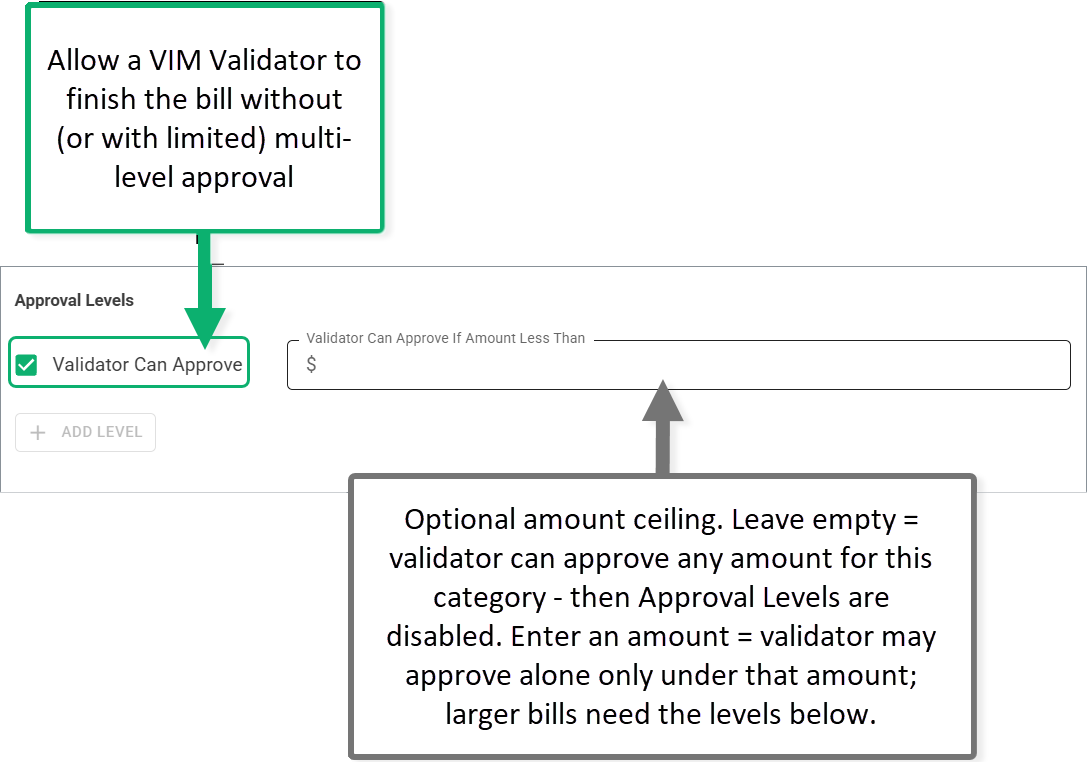
Validator Can Approve
Setting | What it does |
|---|---|
Validator Can Approve | Allows a VIM Validator to finish the bill without (or with limited) multi-level approval. |
Validator Can Approve If Amount Less Than | Optional amount ceiling. Leave empty = validator can approve any amount for this category — then Approval Levels are disabled. Enter an amount = validator may approve alone only under that amount; larger bills need the levels below. |
If you want full multi-level approval: turn Validator Can Approve off, or set a limit and configure levels for amounts above it.
If you mark validator can approve with an empty limit: do not configure approval levels — Fieldclix turns them off.
Approval Level #1, #2, …
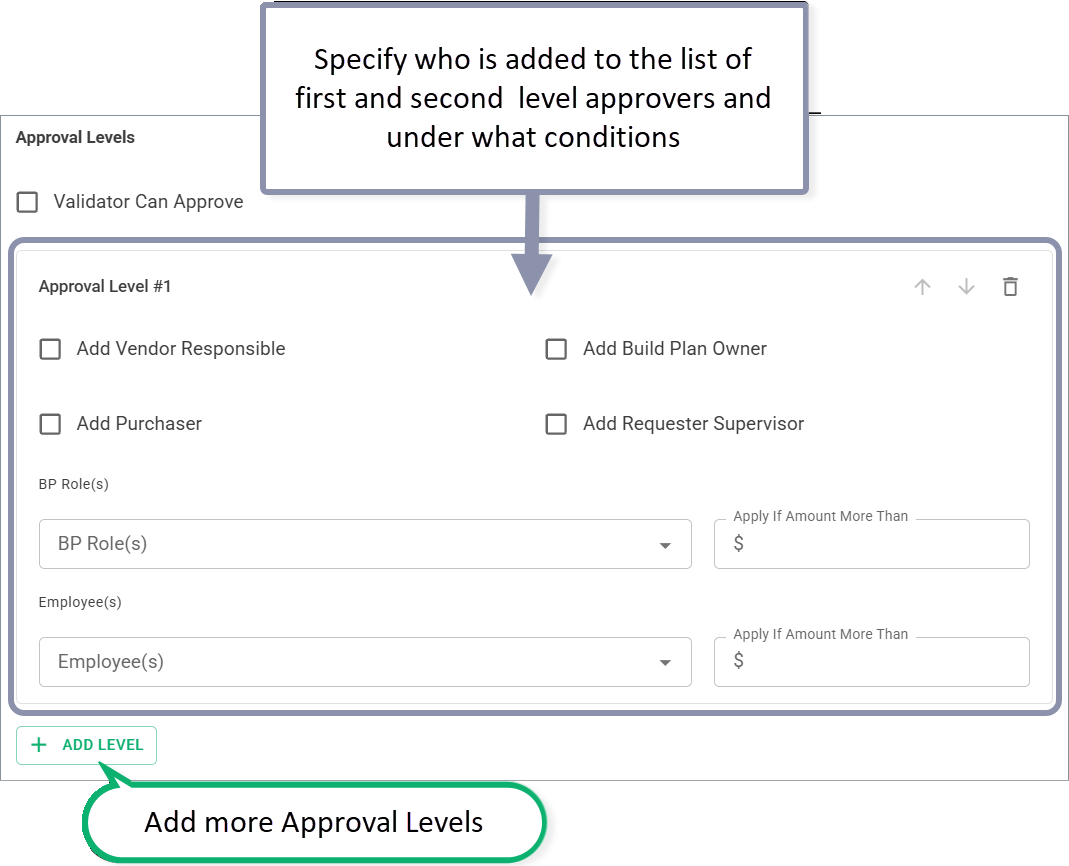
Add one or more Approval Levels (order matters: level 1 first, then level 2, and so on).
On each level you can mix:
Option | Who gets added as approver |
|---|---|
Add Vendor Responsible | Responsible person from the Vendor record |
Add Build Plan Owner | Owners of Build Plans on the invoice lines (all distinct owners) |
Add Purchaser | Purchaser linked to the PO / purchase context when applicable |
Add Requester Supervisor | Supervisor of the invoice Requester when Requester and supervisor are set |
BP Role(s) + Apply If Amount More Than | Employees with those Build Plan roles, optionally only above an amount |
Employee(s) + Apply If Amount More Than | Named employees, optionally only above an amount |
Fieldclix calculates default approvers when the invoice is validated. Validators can still change first-level approvers on the invoice (Change 1st level Approvers / Recalculate Approvers) when the process allows it — Recalculate keeps manual first-level people; Validate rebuilds without keeping them.
Who does what (quick map)
Role | Uses categories how |
|---|---|
Accountant / Project Library Manager | Creates and edits Invoice Categories |
VIM Validator | Sees category rules when validating and approving |
Approvers | Appear because of the levels you configured |
Day-to-day validate / approve steps: Process Vendor Invoices.
Checklist before go-live
Create an Active category for each major bill type (materials, subcontract, utilities, COD-related, and so on).
Set Allocation Type and useful Defaults.
Decide Sync to External System per category.
Configure Validator Can Approve and/or Approval Levels (including amount thresholds — remember greater than, not “greater than or equal”).
On Vendors, set the default Invoice Category so capture and manual create pick the right one.
FAQ
Q: Should I use Build Plan Owner on a Purchase Order category?
A: Usually prefer Add Purchaser for PO-driven bills. Add Build Plan Owner remains available; if you enable it, owners from line Build Plans are added.
Q: Does Add Requester Supervisor only work for COD?
A: No — it adds the supervisor of the invoice Requester whenever Requester and supervisor are set. COD also has a separate Requester → supervisor substitution when the Requester is already on a level from another rule.
Q: What is different about Asset and ITJ categories?
A: On the invoice, pick the Asset or ITJ as required. Line Financial Account is not used, and Fieldclix does not build automatic Financial Distribution from those lines. Use Purchase Order or Financial Account when you need automatic FD from Build Plan lines.
Q: Does Apply If Amount More Than include the threshold amount?
A: No. Roles / named employees are added only when Total is greater than the threshold. Equal to the threshold does not add them. Leave empty to always add them when the level runs.
Q: Validator can approve any amount — why are approval levels grayed out?
A: Validator Can Approve is on and the amount limit is empty. Clear unlimited validator approval, or set a limit, if you need levels.
Q: Does changing a category on an existing invoice rebuild lines?
A: Changing Vendor or Category can refresh defaults and lines. Confirm allocation after you change them. On COD, changing Vendor / Category / Allocation Type does not rebuild default lines the same way — edit the existing COD line(s) instead.
Next in the set
Related
Was this article helpful?
That’s Great!
Thank you for your feedback
Sorry! We couldn't be helpful
Thank you for your feedback
Feedback sent
We appreciate your effort and will try to fix the article